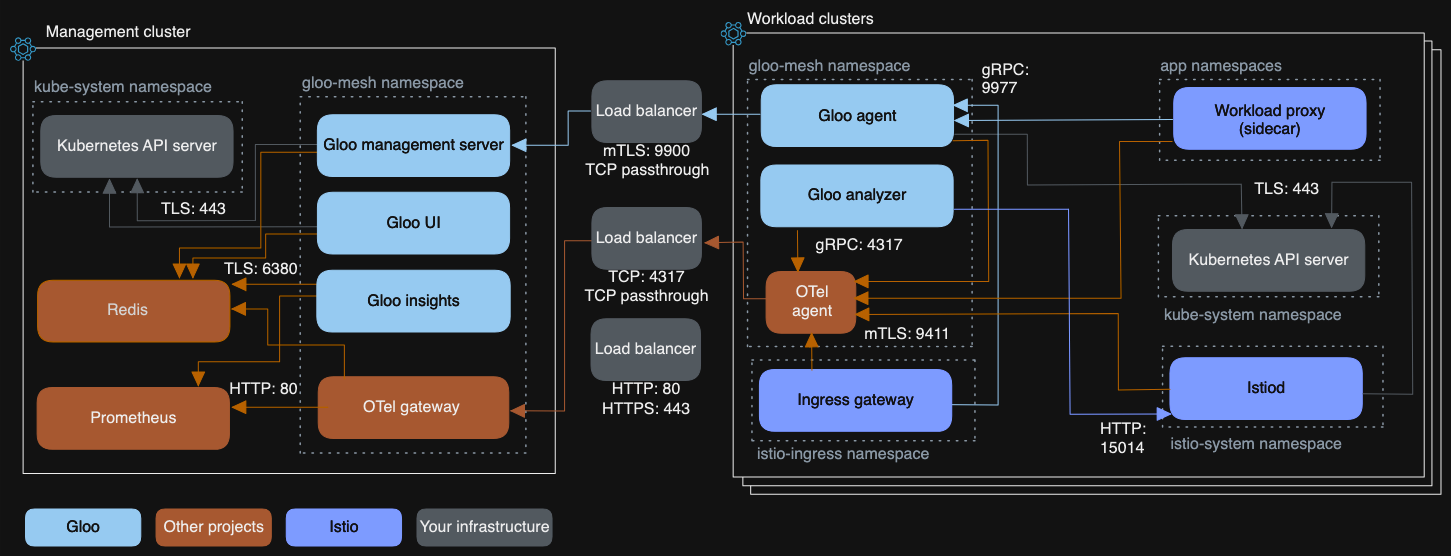
Istio identifiers
- Cluster ID
- A unique name for a Kubernetes cluster
- Network ID
- The cluster’s underlying network
- Mesh ID
- A logical name for an entire service mesh
- Trust Domain
- The cryptographic root for workloads
- KubernetesCluster (Gloo)
- A Kubernetes cluster that has been registered with a Gloo Mesh management server.
Cluster ID
What is it?
A unique name for a Kubernetes cluster.
What is its purpose?
Used by Istio to manage endpoints for service discovery across multiple kubernetes clusters.
How is it used?
Can be used in DestinationRule subsets to reference the topology.istio.io/cluster label for cluster-based routing and failover
kind: DestinationRule
metadata:
 name: my-service-clusters
 namespace: my-namespace
spec:
 host: my-service.my-namespace.svc.cluster.local
 subsets:
   - name: cluster-a-subset
     labels:
       topology.istio.io/cluster: cluster-a
   - name: cluster-b-subset
     labels:
       topology.istio.io/cluster: cluster-b
apiVersion: networking.istio.io/v1
kind: VirtualService
metadata:
 name: my-service-route
 namespace: my-namespace
spec:
 hosts:
   - my-service.my-namespace.svc.cluster.local
 http:
 - route:
   # Rule 1: Send traffic from cluster-a to the cluster-a-subset
   - destination:
       host: my-service.my-namespace.svc.cluster.local
       subset: cluster-a-subset
     weight: 100
     match:
     - sourceLabels:
         topology.istio.io/cluster: cluster-a
   # Rule 2: Send traffic from cluster-b to the cluster-b-subset
   - destination:
       host: my-service.my-namespace.svc.cluster.local
       subset: cluster-b-subset
     weight: 100
     match:
     - sourceLabels:
         topology.istio.io/cluster: cluster-b
Where is it set?
helm install istiod istio/istiod -n istio-system --set global.meshID=mesh1 --set global.multiCluster.clusterName=cluster1 --set global.network=network1
Where can it be found?
https://istio.io/latest/docs/reference/config/labels/#TopologyCluster
clusterID is a label that is used internally within Istio, and is not an actual Kubernetes label.
kubectl describe deployment istiod -n istio-system | grep -A 1 CLUSTER_ID
CLUSTER_ID: cluster2istioctl zc workloads -o json|jq '.[0]'
{
  "uid": "cluster2//Pod/boa/accounts-db-0",
  "workloadIps": [
    "10.244.3.46"
  ],
  "protocol": "HBONE",
  "name": "accounts-db-0",
  "namespace": "boa",
  "serviceAccount": "default",
  "workloadName": "accounts-db",
  "workloadType": "pod",
  "canonicalName": "accounts-db",
  "canonicalRevision": "latest",
  "clusterId": "cluster2",
  "trustDomain": "cluster.local",
  "locality": {},
  "node": "talos-enh-oqy",
  "network": "cluster2",
  "status": "Healthy",
  "hostname": "",
  "capacity": 1,
  "applicationTunnel": {
    "protocol": ""
  }
}
istioctl zc services -o json|jq '.[0]'
{
  "name": "accounts-db",
  "namespace": "boa",
  "hostname": "accounts-db.boa.svc.cluster.local",
  "vips": [
    "cluster2/10.103.144.117"
  ],
  "ports": {
    "5432": 5432
  },
  "endpoints": {
    "cluster2//Pod/boa/accounts-db-0": {
      "workloadUid": "cluster2//Pod/boa/accounts-db-0",
      "service": "",
      "port": {
        "5432": 5432
      }
    }
  },
  "ipFamilies": "IPv4"
}
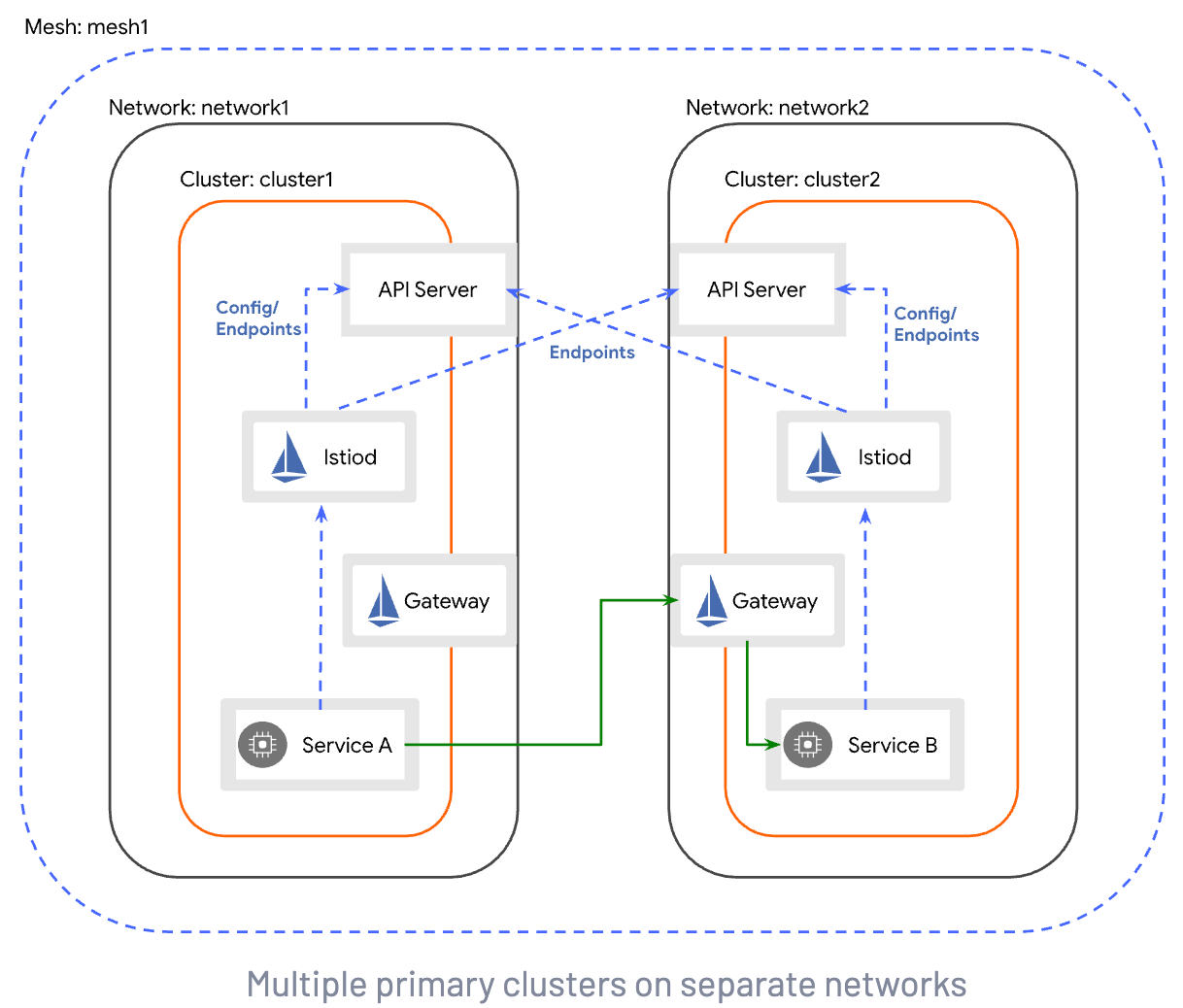
Diagram
https://istio.io/latest/docs/setup/install/multicluster/multi-primary_multi-network/
Network ID
What is it?
A label for a cluster’s underlying network. Represents a grouping of workloads in the same Layer 3 domain that can communicate directly with each other.
How is it used?
Can be used in DestinationRule subsets to reference the topology.istio.io/network label for network-based routing and failover.
Istio automatically prioritizes endpoints in the same network.
apiVersion: networking.istio.io/v1
kind: DestinationRule
metadata:
 name: my-service-network-route
spec:
 host: my-service.default.svc.cluster.local
 subsets:
 - name: west
   labels:
     topology.istio.io/network: network-west
 - name: east
   labels:
     topology.istio.io/network: network-east
apiVersion: networking.istio.io/v1
kind: VirtualService
metadata:
 name: my-service-network-routing
spec:
 hosts:
 - my-service.default.svc.cluster.local
 http:
 - route:
   - destination:
       host: my-service.default.svc.cluster.local
       # Direct all traffic to the 'west' network subset
       subset: **west**
     weight: 100
Where is it set?
Globally:
helm install istiod istio/istiod -n istio-system --set global.meshID=mesh1 --set global.multiCluster.clusterName=cluster1 --set global.network=network1
meshConfig:
  defaultConfig:
    proxyMetadata: ISTIO_META_NETWORK: "network1"
kubectl label ns topology.istio.io/network=network1
Per-workload:
Namespace/Deployment:
kubectl label namespace ns topology.istio.io/network=networkID
kubectl label deployment ns topology.istio.io/network=networkID
Where can it be found?
Global setting:
kubectl get ns istio-system --show-labels
NAME           STATUS   AGE   LABELS
istio-system   Active   9d    kubernetes.io/metadata.name=istio-system,topology.istio.io/network=cluster2
Workload setting:
{
  "uid": "cluster2//Pod/boa/accounts-db-0",
  "workloadIps": [
    "10.244.3.46"
  ],
  "protocol": "HBONE",
  "name": "accounts-db-0",
  "namespace": "boa",
  "serviceAccount": "default",
  "workloadName": "accounts-db",
  "workloadType": "pod",
  "canonicalName": "accounts-db",
  "canonicalRevision": "latest",
  "clusterId": "cluster2",
  "trustDomain": "cluster.local",
  "locality": {},
  "node": "talos-enh-oqy",
  "network": "cluster2",
  "status": "Healthy",
  "hostname": "",
  "capacity": 1,
  "applicationTunnel": {
    "protocol": ""
  }
}
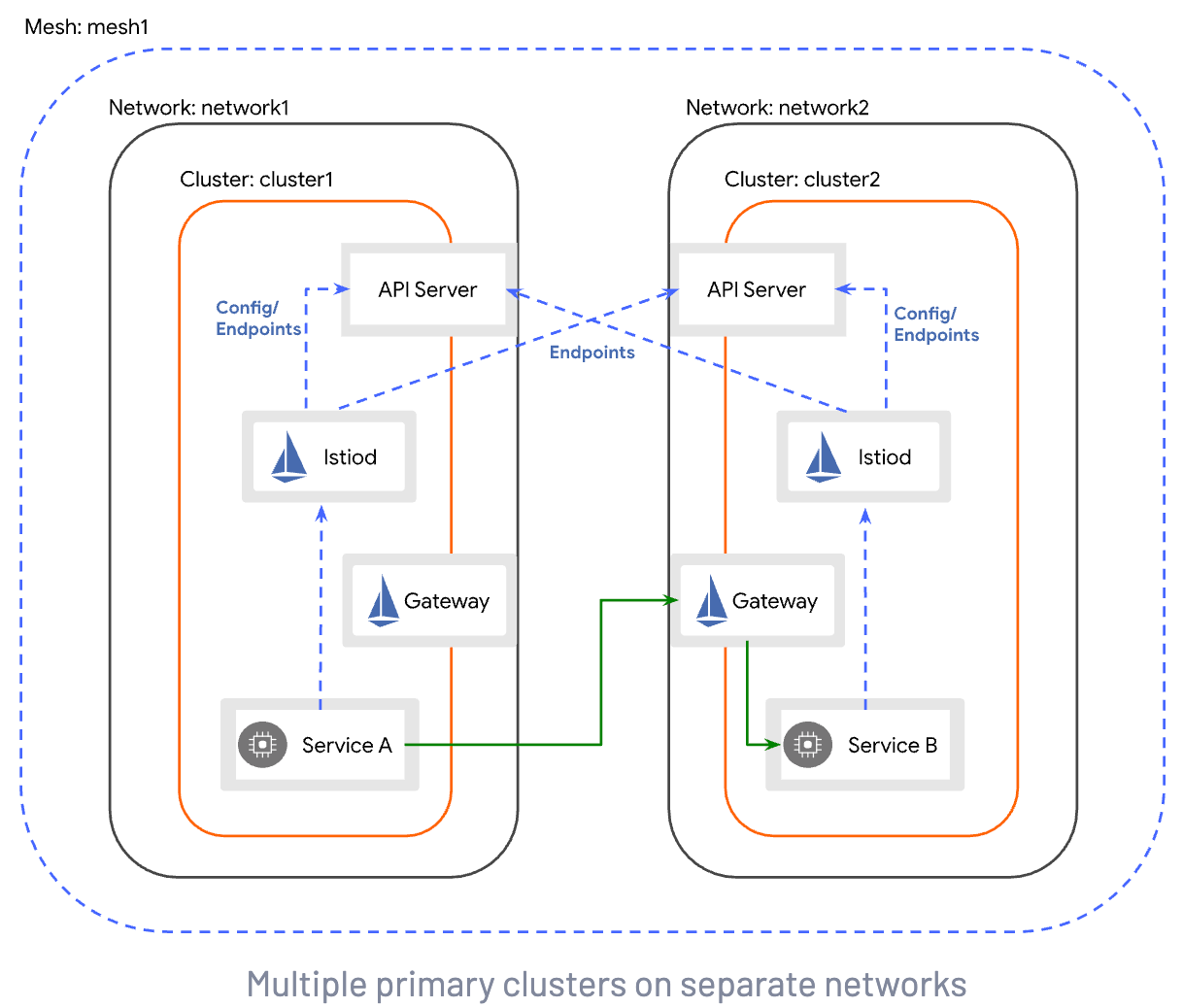
Diagram
https://istio.io/latest/docs/setup/install/multicluster/multi-primary_multi-network/
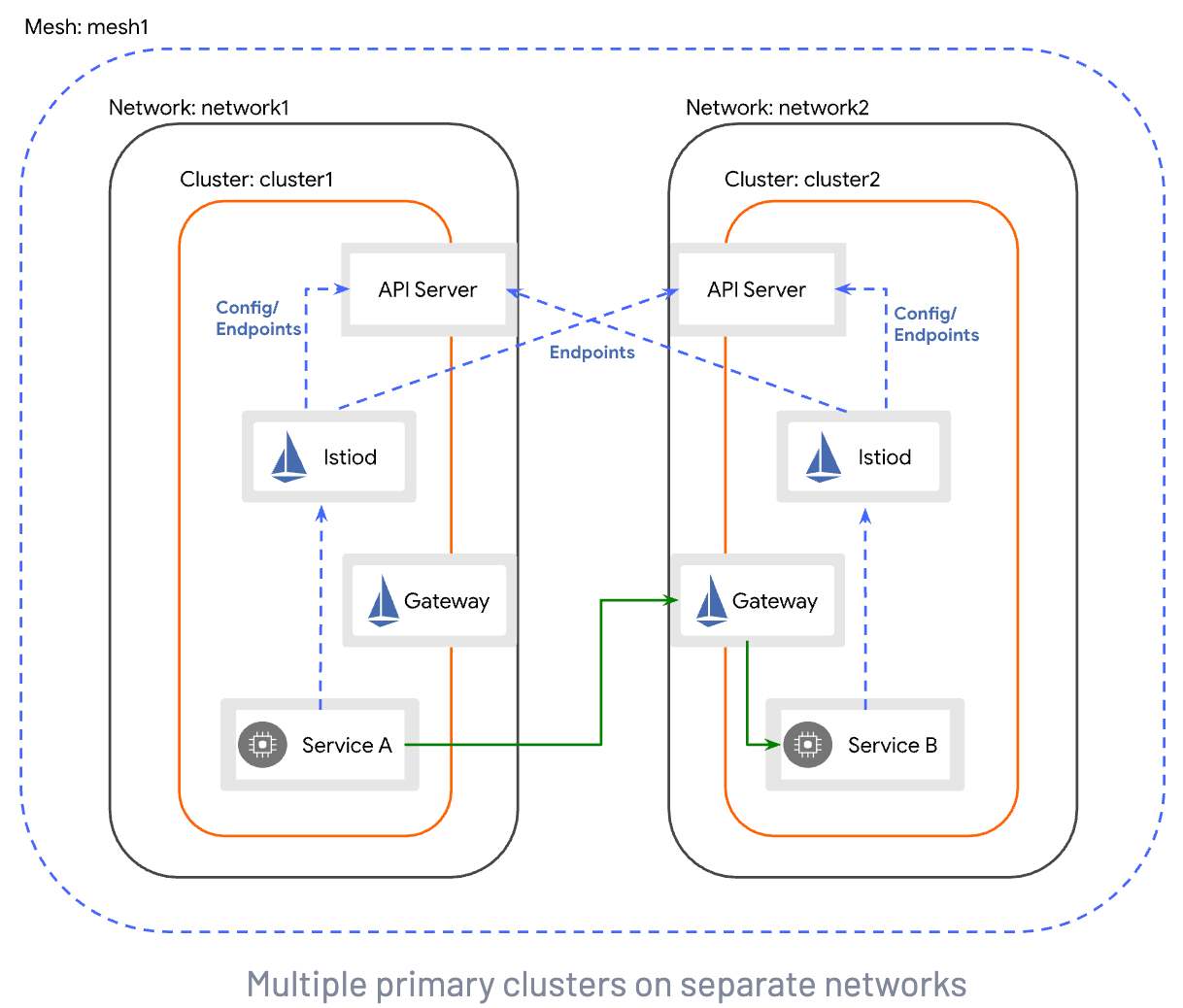
Mesh ID
What is it?
A logical name for an entire service mesh.
How is it used?
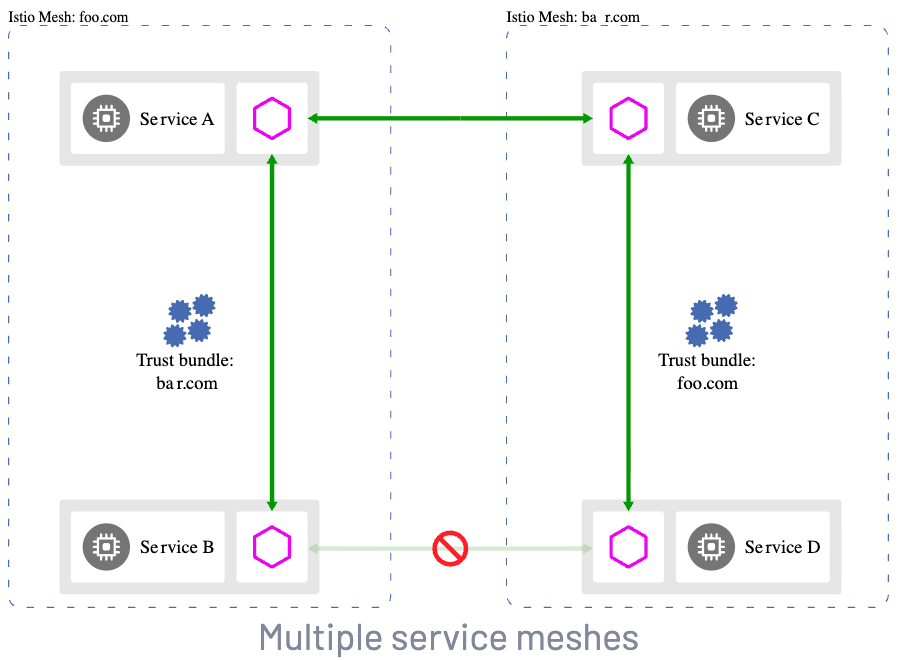
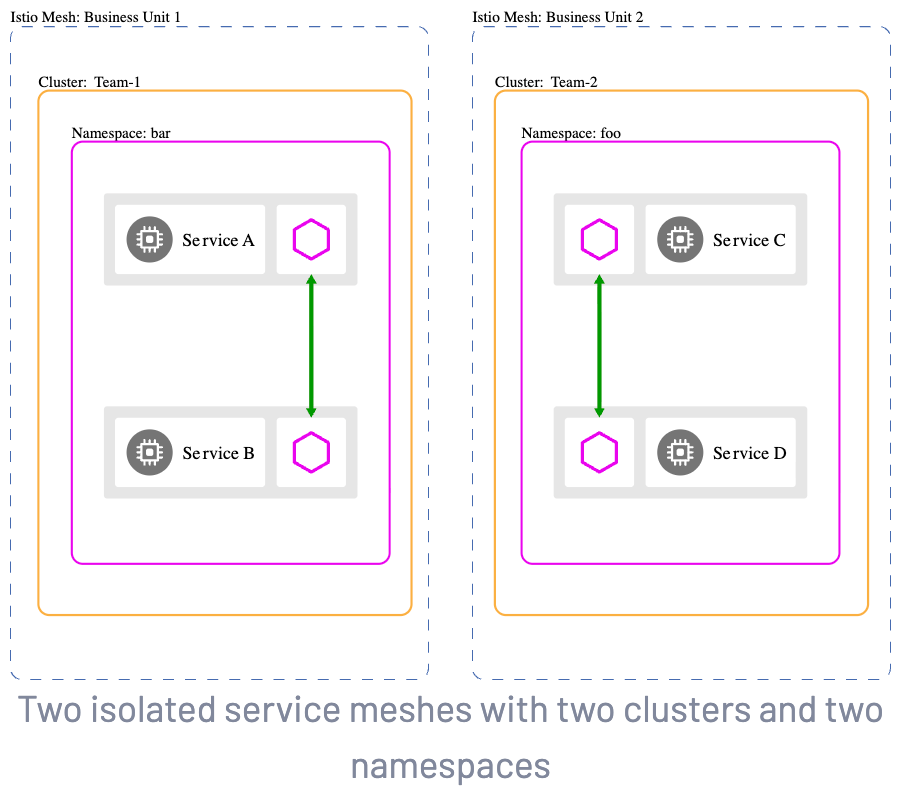
The Mesh ID is typically used in federated service meshes to identify services endpoints that are in a different administrative zone (i.e., a different service mesh).
In a multi-mesh trust setup, the Mesh ID is used as part of the FQDN when addressing endpoints in other clusters.
Can be the same for a single logical mesh spanning multiple clusters
Where is it set?
helm install istiod istio/istiod -n istio-system --set global.meshID=mesh1 --set global.multiCluster.clusterName=cluster1 --set global.network=network1
meshConfig:
  meshId: "mesh1"
Where can it be found?
kubectl get deployment istiod -n istio-system -o yaml
kubectl get configmap istio -n istio-system -o yaml
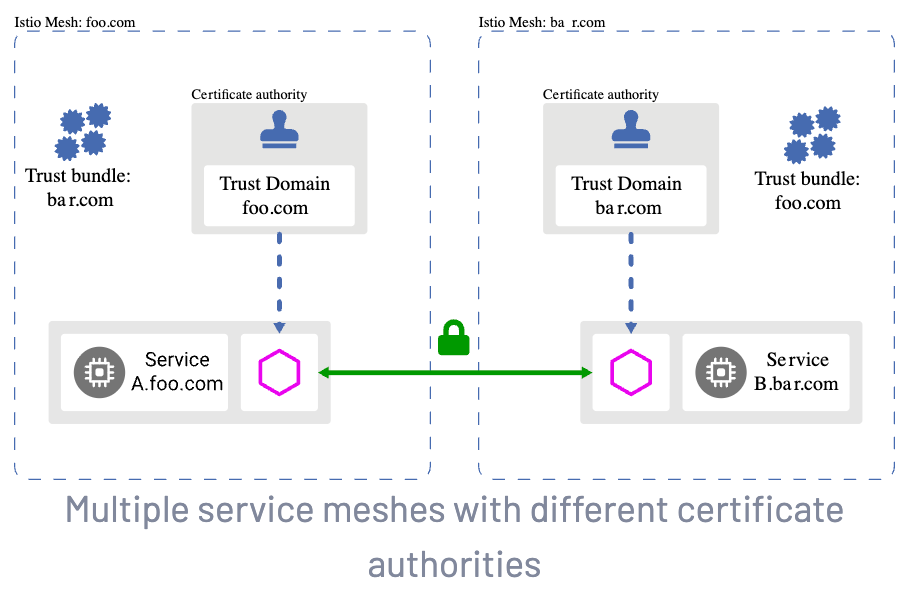
Diagram
https://istio.io/latest/docs/ops/deployment/deployment-models/#multiple-meshes
Trust Domain
What is it?
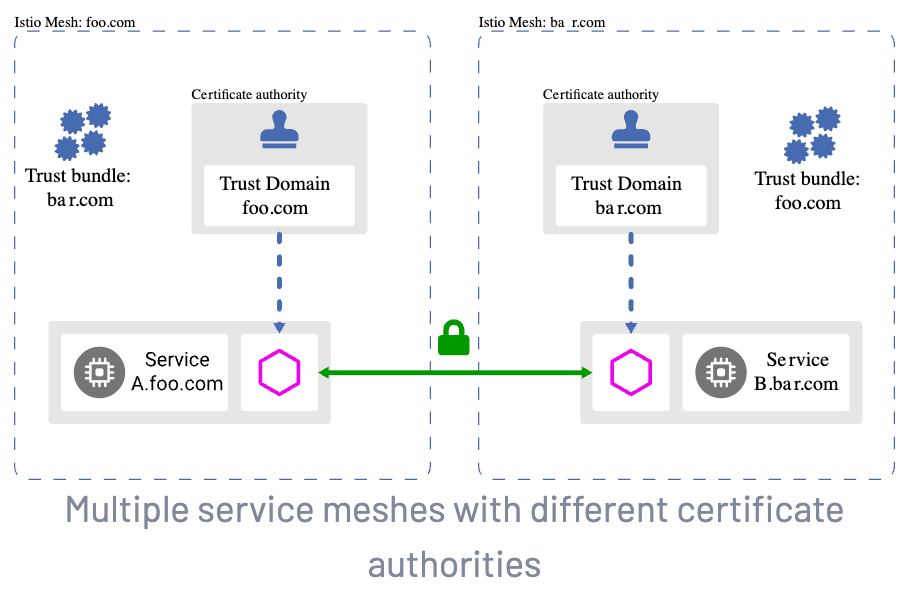
The root of cryptographic identity for all workloads.
How is it used?
Forms the root of the SPIFFE ID (e.g., spiffe://example.com/sa/...)
When a service connects to another service, verification is done to ensure that the certificate was issued to the source by an authority that is trusted within the configured Trust Domain for the destination. This guarantees that the caller is a genuine member of the mesh.
Can be used in AuthorizationPolicies to validate source/destination traffic (as part of a workloads SPIFFE principal
apiVersion: security.istio.io/v1beta1
kind: AuthorizationPolicy
metadata:
 name: test
 namespace: default
spec:
 selector:
   matchLabels:
     app: app2
 rules:
 - from:
   - source:
       principals: ["cluster.local/ns/default/sa/app1"]
     when:
     - key: source.metadata.labels[topology.istio.io/cluster]
       values: ["cluster1"]
Where is it set?
Defaults to the clusterName when using ServiceMeshController if not explicitly set
meshConfig:
  trustDomain: td1
  trustDomainAliases: ["td2", "td3"]
Must be the same, aliased, or not validated for a single mesh to enable secure MTLS communication
istiod:
  PILOT_SKIP_VALIDATE_TRUST_DOMAIN: "true"
kubectl get deploy -n istio-system istiod -o yaml|grep VALIDATE -A 1
- name: PILOT_SKIP_VALIDATE_TRUST_DOMAIN
value: "true"
Trust domain aliases can be used (when PILOT_SKIP_VALIDATE_TRUST_DOMAIN: "false") to allow service meshes with different trust domains to trust each other
https://istio.io/latest/docs/reference/config/istio.mesh.v1alpha1/#MeshConfig-trust_domain_aliases
Where can it be found?
kubectl get configmap istio -n istio-system -o yaml|grep trustDomain
trustDomain: cluster.localistioctl zc workloads -o json|jq '.[0]'|grep trustDomain
"trustDomain": "cluster.local",Diagram
https://istio.io/latest/docs/ops/deployment/deployment-models/#identity-and-trust-models
KubernetesCluster (Gloo)
What is it?
A resource representing a Kubernetes cluster that has been registered with the Gloo Mesh management server.
How is it used?
Must be set before a Gloo Mesh agent can connect with a Gloo Mesh management server.
A clusters ClusterID and KubernetesCluster metadata.name MUST match for the service mesh graph to function in the Gloo UI (troubleshooting)
Where is it set?
Set on the Gloo Mesh management server
https://docs.solo.io/gloo-mesh-gateway/main/reference/api/kubernetes_cluster/#kubernetesclusterspec
apiVersion: admin.gloo.solo.io/v2
kind: KubernetesCluster
metadata:
 name: cluster1
 namespace: gloo-mesh
spec:
 clusterDomain: cluster.local
Where can it be found?
Can be found as a Custom Resource on the Gloo Mesh management server
kubectl get KubernetesCluster -A
NAMESPACE   NAME       STATUS
gloo-mesh   cluster2   ACCEPTED
Diagram
https://docs.solo.io/gloo-mesh/latest/about/architecture/#networking-architecture